

Best amp sim plugins for low-tuned metal guitars in 2026
Best overall for comparing high-gain amp sims: AMP SIM BUNDLE. Best for a NAM-based rig: RITUAL 2 AMP LOADER; this 2026 guide separates complete amp sim plugins for low-tuned guitars from profile packs, then shows you how to judge palm-mute definition inside a mix.
- Oracle Sound's AMP SIM BUNDLE is the best fit here for producers comparing several high-gain amp sims.
- RITUAL 2 AMP LOADER suits NAM-based guitar rigs; profile packs supply tones rather than a separate plugin.
- Choose amp sim plugins for low-tuned guitars by palm-mute definition, note separation and workflow—not gain alone.
- Compare the same DI performance at matched output levels before changing cabinets, profiles or EQ.
Why this matters
Low-tuned guitars need distortion that leaves the rhythm readable. Extra gain sustains notes, but it also makes the gap between a tight chug and a loose one harder to hear.
The production problem is bigger than the amp model. Your DI level, preamp filtering, cabinet stage and bass arrangement all affect whether the low string punches or turns into a sustained rumble.
Oracle Sound's AMP SIM BUNDLE is the best fit here for producers comparing several high-gain amp sims in one DAW. For a profile-based setup, choose a NAM loader first and audition compatible profiles through it. Those are different workflows, not interchangeable product types.
What makes the best amp sim plugins for low-tuned guitars?
Use these criteria for your 2026 shortlist before chasing a particular amp name:
- Palm-mute recovery: Listen to the space after each muted hit. The next attack should remain distinct rather than disappearing beneath the previous note.
- Chord separation: Test a riff with adjacent strings ringing. A convincing single-note chug does not prove that a tone works for dissonant chords.
- Input control: Establish a repeatable DI level. Changing the signal entering a nonlinear amp stage changes the distortion, not just the volume.
- Cabinet workflow: Know where the cabinet sound enters the chain. Judge the amp and cabinet together, then change one stage at a time.
- DAW practicality: Check the required plugin format, monitoring setup and session behaviour before committing a recording template.
No published performance measurements accompany these picks. The ranking below assigns distinct production jobs; it does not claim that one engine has better latency, lower CPU use or more accurate modelling than another.
Low-tuned guitar options at a glance
| Item | Best for | Standout feature or purpose | Key limitation |
|---|---|---|---|
| AMP SIM BUNDLE | Comparing several high-gain amp plugins | TYRANT, SLAMP, SVARTRUNA and CATAMP together | More choices to audition before settling on a session default |
| RITUAL 2 AMP LOADER | Building a NAM-based software rig | Plugin and standalone operation on PC and Mac | Loading profiles adds a separate tone-selection step |
| WVRMFOOD Hardcore High Gain NAM Profiles | Hardcore-focused profile selection | NAM profiles explicitly aimed at hardcore high gain | A profile pack, not a standalone amp sim plugin |
| Suneater Doom Sludge Stoner Guitar Tone NAM Profiles | Doom, sludge and stoner profile selection | A NAM profile route labelled for those styles | Genre positioning does not establish tightness on your particular DI |
The final two entries are alternatives within a NAM rig, not additional plugin engines. Include them in your decision only if you want a profile-loading workflow.
1. AMP SIM BUNDLE: best for comparing high-gain amp sims
AMP SIM BUNDLE brings together TYRANT, SLAMP, SVARTRUNA and CATAMP. Oracle Sound describes all four as high-gain amp sim plugins, each with its own pedal section and cabinets.
That makes the bundle a useful starting point when your production work spans different heavy guitar arrangements. Compare the included plugins on one recorded DI instead of judging separate performances played through different settings.
AMP SIM BUNDLE pros:
- Four named high-gain amp sims give you several starting points.
- Each included amp sim has a pedal section.
- Each included amp sim has cabinets, letting you assess more than the distortion stage.
AMP SIM BUNDLE cons:
- Four alternatives create more auditioning work than committing to one rig.
- A bundle does not remove the need to establish input level and balance the guitar against bass and drums.
Best for: Producers building a reusable high-gain guitar template rather than choosing a NAM profile collection.
For a practical comparison, use an 8-bar DI loop containing muted notes, open chords and a sustained ending. Keep the performance unchanged, match the output levels and save one candidate from each amp sim. Choose the candidate that holds the rhythm together with the band playing.
Verdict: Buy for a multi-plugin high-gain workflow; hold if you already have a settled rig.
2. RITUAL 2 AMP LOADER: best for a NAM-based rig
RITUAL 2 AMP LOADER loads NAM profiles and runs as a plugin or standalone application on PC and Mac. The supplied format list specifies VST3, AU and AAX on Mac, and VST3 and AAX on Windows.
Choose this route when profile selection is central to your workflow. The loader is the software host; the NAM profile supplies the captured amp response you audition within it.
RITUAL 2 AMP LOADER pros:
- Supports a NAM-based approach to selecting guitar tones.
- Offers both plugin and standalone operation.
- Lists formats for common Mac and Windows recording workflows.
RITUAL 2 AMP LOADER cons:
- Choosing a loader does not finish the job of choosing a profile.
- Changing the profile changes the audition, so comparisons need a consistent DI and output level.
Best for: Recording engineers who want to build a guitar rig around NAM profiles rather than select several separate amp sim plugins.
In a 2026 recording template, label the loader track clearly and save the profile identity with the session notes. Keep a clean DI alongside the processed guitar so you can revisit the tone without asking for another performance.
Verdict: Buy into this workflow if NAM profile selection suits your sessions; skip it if you want to avoid profile management.
Choose the plugin workflow first
The Oracle Sound choice here is between a collection of high-gain amp sims and a NAM-loading workflow. Pick the route that matches how you want to build sessions; neither choice excuses loose tracking or a poorly balanced low end.


3. WVRMFOOD: best for a hardcore-focused NAM shortlist
WVRMFOOD is identified as a hardcore high-gain NAM profile pack. Its role in this guide is specific: narrowing a NAM search towards hardcore rather than supplying another plugin engine.
Start the audition with the breakdown or fast rhythm part that drives the song. A profile that impresses on a sustained chord still needs to survive abrupt stops and closely spaced palm mutes.
WVRMFOOD pros:
- Explicit hardcore positioning gives the audition a clear stylistic starting point.
- High gain is part of the stated profile focus.
- Fits a NAM-based tone-selection workflow.
WVRMFOOD cons:
- Requires a suitable NAM loader rather than functioning as an independent amp plugin.
- The hardcore label does not establish compatibility details or the result on your guitar.
Best for: Hardcore producers already choosing tones through NAM profiles.
Keep the kick and bass audible while judging the profile. If the guitar only sounds heavy when those tracks are muted, the arrangement still needs work.
Verdict: Buy for a hardcore-directed NAM audition; skip if you need a complete amp plugin instead.
4. Suneater: best for a doom and sludge NAM shortlist
Suneater is identified as a doom, sludge and stoner guitar-tone NAM profile pack. That makes it a style-specific alternative to the hardcore route, not evidence of a particular measured frequency response or gain structure.
Use a different listening test here. Alongside muted riffs, play sustained chords and listen to how the guitar occupies the space around the bass and cymbals.
Suneater pros:
- Explicitly targets doom, sludge and stoner guitar styles.
- Gives a NAM-based shortlist a distinct use case.
- Suits an audition centred on the requirements of those arrangements.
Suneater cons:
- Needs a suitable NAM-loading setup.
- The genre label alone cannot tell you whether a profile suits tightly gated, percussive riffs.
Best for: Producers selecting NAM tones for doom, sludge and stoner sessions.
Do not apply a tight metalcore gate by habit. Set the gate against the quietest intentional decay in the part, then check that sustained chords finish naturally.
Verdict: Buy for a doom-focused NAM workflow; skip as a blind substitute for a percussive rhythm rig.
Build a low-tuned guitar chain that stays readable
Use this sequence when auditioning amp sim plugins for low-tuned guitars. Keep each stage separate enough that you can identify what changed.
- Clean DI: Record without clipping and preserve the unprocessed performance. Check tuning and unwanted string noise before touching the amp.
- Gate: Set the threshold against the quietest intended note. Listen for chopped sustains, not just silent gaps.
- Preamp shaping: If you use an overdrive, begin with its drive low. Adjust its output while listening to how the amp reacts.
- Amp stage: Increase gain until the riff sustains, then reduce it until repeated attacks become distinct again.
- Cabinet stage: Confirm whether the chosen signal already includes cabinet processing before adding another cabinet or IR stage.
- Mix EQ: Filter and balance the processed guitar against the bass, kick and cymbals rather than treating the soloed guitar as the finished sound.
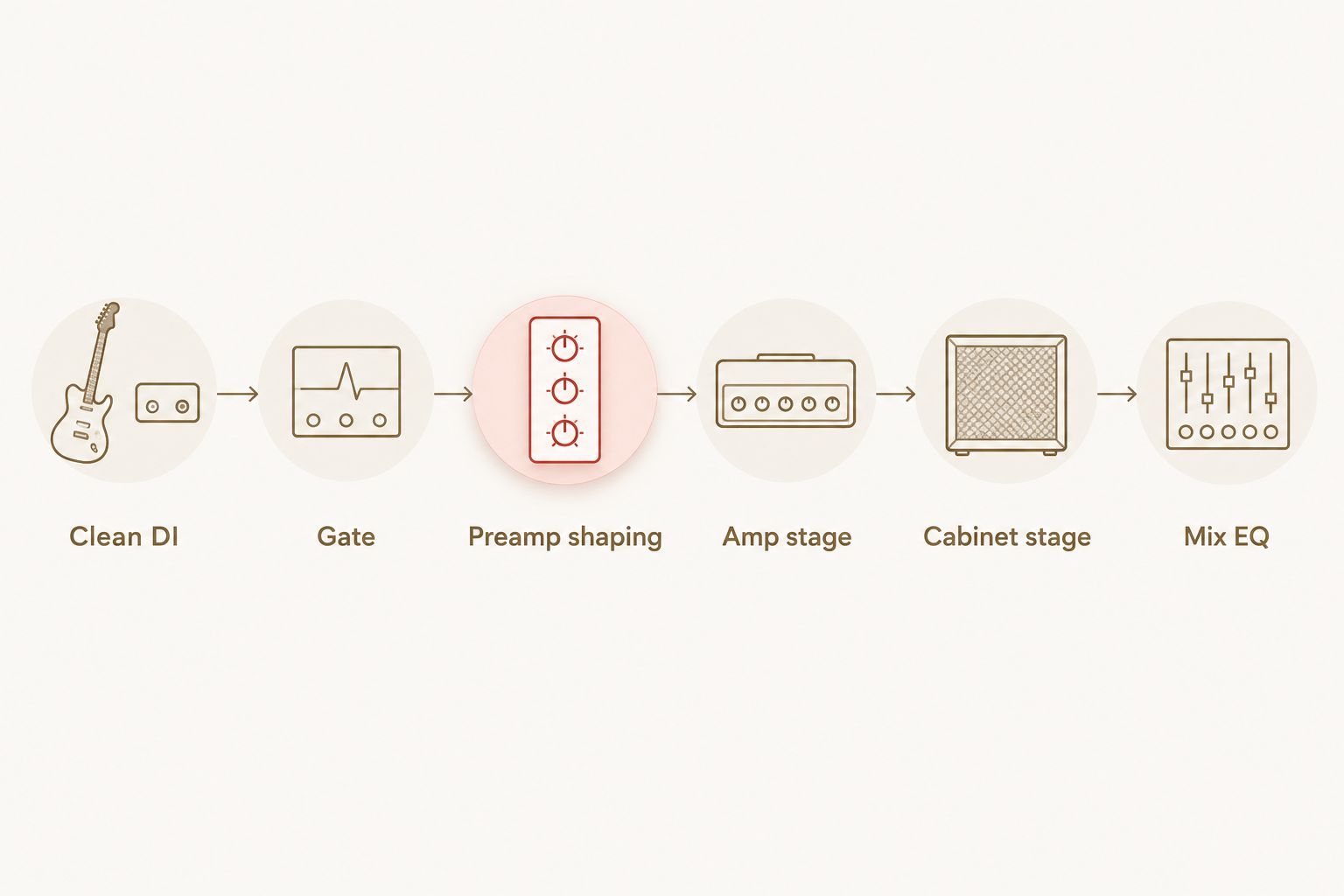
Treat settings as audition moves, not universal rules. Try an 80 Hz high-pass filter after the cabinet stage, then bypass it and listen with the bass playing. Keep it only if the guitar loses unwanted rumble without losing the weight the arrangement needs.
Likewise, audition an 8 kHz low-pass filter if the upper distortion distracts from the pick attack. Move it while the cymbals play; a setting that smooths a soloed guitar can leave the full mix dull.
These are suggested starting points, not specifications or measured sweet spots for any listed product. Your tuning, pickup output, performance and cabinet sound determine the final settings.
How the ranking works
This 2026 ranking follows workflow fit: several high-gain plugins first, a NAM loader second, then two clearly labelled genre-specific profile alternatives. The criteria remain palm-mute recovery, chord separation, input control, cabinet workflow and DAW practicality.
It is not a controlled sound-quality comparison. There are no supplied latency measurements, CPU benchmarks or matched audio tests supporting a technical winner between these options.
For your own comparison, duplicate the same DI onto separate tracks and listen to one processed track at a time. Match perceived output level before deciding. Louder playback is not a useful reason to keep a tone.
Which option should you choose?
Choose AMP SIM BUNDLE as the default if you want several high-gain amp plugins to compare. Choose RITUAL 2 AMP LOADER if you want to select and manage NAM profiles instead.
For a genre-directed NAM shortlist, WVRMFOOD serves the hardcore-labelled route and Suneater serves the doom, sludge and stoner-labelled route. Neither profile pack replaces its loader.
Your final 2026 decision should happen in the session, not on a product-name comparison. Keep the option that makes the riff readable beside the rhythm section with the least corrective work.
FAQ
What's the best starting point for low-tuned metal amp sims?
AMP SIM BUNDLE is the starting pick here for producers who want several high-gain amp plugins to compare. It includes TYRANT, SLAMP, SVARTRUNA and CATAMP; choose by auditioning the same DI through each.
Is a NAM profile the same as an amp sim plugin?
No. A NAM profile supplies a captured response that a compatible loader runs, while the loader is the software application or plugin. Choose both parts of that workflow deliberately.
Does RITUAL 2 AMP LOADER run on Mac and Windows?
Yes. RITUAL 2 AMP LOADER lists VST3, AU and AAX on Mac, VST3 and AAX on Windows, and standalone operation on both platforms.
Should I add more gain for lower guitar tunings?
Lower tuning does not automatically require more gain. Set distortion against sustain and note separation, then judge palm mutes with the bass and drums playing.
Where should a gate go in a metal guitar plugin chain?
Start by auditioning a gate before the amp stage. Set its threshold against the quietest intended notes and check that it does not cut off sustained chords.
Do I need a separate cabinet IR with NAM profiles?
Check what the particular profile includes before adding a cabinet stage. A profile that already includes cabinet processing needs a different chain from an amp-only profile.
Which NAM option here is aimed at hardcore rather than doom?
WVRMFOOD is labelled for hardcore high gain, while Suneater is labelled for doom, sludge and stoner guitar tones. Those labels guide the shortlist; audition the actual profiles against your recorded parts.
One last thing
Before replacing the guitar tone, mute one side of your double-tracked rhythm pair. If the remaining take has clear attacks but the pair sounds smeared, inspect the performances together before changing the plugin.
For your next 2026 session, save the clean DI, the chosen processing chain and a short full-band reference bounce. That gives you a repeatable decision instead of another evening of preset switching.


